Showing posts with label Vista. Show all posts

Monday, January 14, 2008

Microsoft Switches Plan, Offers Vista SP1 Public Beta

http://www.zdnet.com.au/shared/images/insight/vista_view/vistascreen1_440x330.jpg

In a quick turnabout, Microsoft Corp. made the newest tweak to Windows Vista Service Pack 1 (SP1) available to the public on Friday.

Just two days earlier, the new version, dubbed Windows Vista SP1 RC Refresh, had been handed out to a group of about 15,000 testers who had been working with the service pack for several months. At the time, Microsoft said the refresh was "not available for public download."

Friday, it changed its mind and posted instructions on its Web site for downloading and installing the new code using the Windows Update service.

According to the Windows Vista Service Pack 1 RC Refresh Public Availability Program, users must uninstall Vista SP1 Release Candidate -- the earlier version offered to the general public a month ago -- before attempting to download and install the refresh.

The refresh requires the same time-consuming, multiple-reboot process used by Vista SP1 RC in December. Also, users who have uninstalled that version must wait an hour before beginning the laborious update. "The installer service needs to clean up and complete the uninstall prior to installing the RC," said instructions posted on the Web. "Failing to do this can result in installation errors when installing the RC version."

Three prerequisite updates are also required before SP1 can be installed. Windows Update feeds them to the PC prior to downloading SP1, with a reboot after each. One of the prerequisites is a patch Microsoft mistakenly sent to all Vista users' PCs last week when it meant to send it only to machines running Vista Enterprise or Vista Ultimate.

The company, which has slated Vista SP1 for final delivery this quarter, said as recently as Thursday that the update remains on track.

Friday, January 11, 2008

Don't Upgrade to Vista, UK Gov't Agency Tells Schools

http://laptoping.com/wp-content/windows_vista_ultimate.jpg

British schools should not upgrade to Microsoft's Vista operating system and Office 2007 productivity suite, the British Educational Communications and Technology Agency (BECTA) said in a report on the software. It also supported use of the international standard ODF (Open Document Format) for storing files.

Schools might consider using Vista if rolling out all-new infrastructure, but should not introduce it piecemeal alongside other versions of Windows, or upgrade older machines, said the agency, which is responsible for advising British schools and colleges on their IT use.

"We have not had sight of any evidence to support the argument that the costs of upgrading to Vista in educational establishments would be offset by appropriate benefit," it said.

The cost of upgrading Britain's schools to Vista would be £175 million (US$350 million), around a third of which would go to Microsoft, the agency said. The rest would go on deployment costs, testing and hardware upgrades, it said.

Even that sum would not be enough to purchase graphics cards capable of displaying Windows Aero Graphics, although that's no great loss because "there was no significant benefit to schools and colleges in running Aero," it said.

As for Office 2007, "there remains no compelling case for deployment," the agency said in its full report, published this week.

The agency was equally skeptical about the benefits of Vista and Office 2007 last January, when it published an interim report based on its evaluation of beta versions of the new software. Then, it advised that the added value of Vista's new features was not sufficient to justify the cost of deployment, while Office 2007 contained no "must-have" features.

In this year's report, BECTA warned schools that do choose to use Office 2007 to avoid Microsoft's OOXML (Office Open XML) document format because of concerns about compatibility between different applications -- even though interoperability is one of the benefits Microsoft claims for the format.

It called on schools to make teachers, parents and pupils more aware of free alternatives to Microsoft's products, and asked the IT industry to facilitate their use.

The agency also recommended setting up desktops to make it easy to use such open-source applications, and advised schools to insist their suppliers deliver office productivity software that can open and save ODF documents, setting it as the default file format.

However, it slammed Microsoft for dragging its feet with incorporating support for ODF in Office 2007.

"While the product includes the functionality to read virtually every other relevant file format 'out of the box', the processes for dealing with ODF files are very cumbersome," BECTA wrote.

In addition, it said, ODF file converters provided by Microsoft are not intuitive because they behave differently from the regular file save dialogs.

"We believe that these arrangements present sufficient technical difficulties for the majority of users to make them disinclined to use competitor products and this may weaken competition," the agency said.


Source

Thursday, January 3, 2008

Finding Certified for Windows Vista Devices

http://img244.imageshack.us/img244/9659/title15291cawa4.th.jpg

Ever in need to search for a Certified for Windows Vista device? I've got the site just for you. A few weeks ago I needed to find some Certified for Windows Vista devices in a specific category: printers. I was directed by a friend to the Windows Vista Hardware Compatibility site where they offer a searchable and categorized database for both Certified for Windows Vista devices and Works with Windows Vista devices. Check it out. I found exactly what I was looking for.

I also stumbled upon the "Look for the Logo" Gadget for Windows Sidebar which allows you to search for Certified for Windows Vista devices right from your desktop. Even better, the gadget was developed by gadget master Donavon West.

2 great resources for Certified for Windows Vista devices!

Source

Sunday, December 30, 2007

Serious flaw discovered in Windows Vista's Explorer

http://www.sizlopedia.com/wp-content/uploads/windows-vista-box.jpg

At a time where everyone is anxiously awaiting the upcoming service pack for Windows Vista (and while others flock back to Windows XP in droves), yet another flaw in the Windows Vista operating system has been discovered that can bring the Windows shell ("Windows Explorer") to its knees within 20 seconds. Even worse, this issue occurs under every day usage of the operating system if you use the Search function regularly with boolean search operators.

1. Click on Start, and then click on Documents.

2. In the Search entry box, type "NOT Shortcut" (without the quotes).

3. Click on the "Save Search" button and save the search query as "Search Test".

This has been confirmed as a flaw in Windows Vista (all editions) and Windows Vista 64-bit (all editions), and even worse, the issue still occurs on the latest release candidate for Service Pack 1. The bigger question is, will Microsoft step up to the plate and fix this issue or will they let it pass on by while they work heavily on Windows "7", ignoring the fact that Windows Vista still has flaws and inconsistancies that are seeing larger companies hold back deployment until 2009 or even skip Vista?

Source

Wednesday, December 26, 2007

Twitter with Friends Using the WPF Client Witty

Twittering with friends seems to be the new "thing-to-do" on the web these days. Many bloggers are using it and it has even made its way into an episode of CSI! So what exactly is Twitter you ask? Twitter is an online web service that lets you post what you are doing - in 140 characters or less - in which those who are "following" can track what you're doing based on what you post. Bloggers sometimes also use Twitter to share URLs and to share quick thoughts on a variety of topics.

Now I said that Twitter was a web service right? Well the Twitter developers have released an API in which developers can use to create "Twitter clients" to be used outside the web browser.

Alan Le, from the company Vertigo, has utilized the Twitter API and designed a WPF Twitter client called Witty that extends the Twitter experience into Windows Vista. If you recall, WPF (Windows Presentation Foundation) is built in to Windows Vista.

I also blogged about another awesome product from the Vertigo folks back in August called Family.Show. Family.Show is a WPF app used in tracking family history and creating a family tree.

With Witty, I can quickly receive updates from people I am following as well as quickly post on what I'm doing (or any specific thought quickly I might have) quickly as the app nicely sits on my notification area of my taskbar.

To install Witty, just download the .zip file (above) and extract to a folder on your PC. Once the files are extracted, open the folder the files were extracted to and double click on Witty.exe. Feel free to follow me! You cal also follow the Windows Vista Team Blog on Twitter as well - which will update whenever a new post is made here on the blog.

Please note that the latest version of Witty released is 0.1.5 - which is what I recommend you use. My screenshots reflect 0.1.6 but it is an early alpha (pre-beta) version of Witty I am helping test out for Alan. For future versions of Witty, feel free to leave comments and I'll make sure Alan gets them!

Download: Witty 0.1.5 (986Kb)

Source

Wednesday, December 12, 2007

Microsoft rebrands PlaysForSure to Certified For Windows Vista, confuses world


Microsoft's PlaysForSure DRM just took another step closer to the grave with the help of some rebranding. Those of you with players from SanDisk, Nokia, and Creative among others, looking for compatible music from Napster, Real Rhapsody, Yahoo Music, Wal-Mart and such must now look for the "Certified for Windows Vista" logo, not PlaysForSure. Of course, Microsoft's Zune is also certified for Windows Vista, just not certified for Windows Vista so it won't play back the same protected files. Man, could DRM get any more consumer unfriendly?

Homepage
Source

Tuesday, December 11, 2007

Microsoft Offers Windows Vista Ultimate For Free


Microsoft is providing free Vista edition for taking survey and giving feedback. Sign up for the chance to get free Vista. Go to the website provided at the end of this topic, and sign up for the chance to win.

You can use this website to sign up for one or both parts of the program, but note the following restrictions:

  • Participation is currently limited to US residents of 18 years and older.
  • You are the owner of the computer you use for this program.
  • The automated feedback program is offered to Windows Vista and Windows XP customers only.
  • The survey feedback program applies to all versions of Windows.
  • Microsoft, comScore, and MarketTools employees are not eligible to participate.

Sign Up

Friday, December 7, 2007

Generate a List of Installed Drivers from the Command Line

We've already covered how to take a quick look at the list of installed drivers using DriverView, but what if you are on a machine that doesn't already have that software installed? There's a command line utility that comes bundled with Windows Vista or XP that gives you similar output.

It's also useful if you are a command line junkie and have cygwin installed… you can just pipe the command through grep and quickly see exactly what you are looking for.

Running the command with no parameters will give you the default output:

image

To get verbose output you can use the /v parameter:

driverquery /v

Or to output in list or csv format instead of the default table format, you can use the /FO switch

driverquery /FO [list, table, csv]

So for instance, if you ran the following command to give you verbose information in list format:

driverquery /FO list /v

You should see output similar to this:

image

If you have cygwin installed you could pipe this through grep, but you should be able to pipe the output into a file, for instance like this:

driveryquery > test.txt

image

Always useful to know how to use the command line!

Source

Wednesday, December 5, 2007

Announcing Windows Vista SP1 Release Candidate (RC)


Today we're making available the release candidate (RC) of Windows Vista SP1 via Microsoft Connect, and tomorrow subscribers to TechNet and MDSN will have access to those RC bits too.  In addition, the RC will be available to the public next week via Microsoft's Download Center. The release candidate phase of beta software is typically the final phase before the RTM (release-to-manufacturing) of a product and indicates that the code has attained a significant level of performance and stability.

Let me call out several changes made since the Beta release of Service Pack 1 -- many of which came about as a result of direct feedback from our Beta-testing community (thank you!):

  • The size of the standalone installers have decreased significantly. For example, the standalone installer packages consisting of all 36 languages (x86 and x64 chip architectures) are smaller by over 50%. The standalone installer packages consisting of just the 5 languages (again, x86 and x64) slated for initial release are more than 30% smaller in size.
  • The required amount of disc space for SP1 installation has also decreased significantly. Furthermore, with the RC, if more space is required to install SP1, an error message will now display exactly how much space is needed to complete the installation.
  • Previous SP1 versions left behind a directory of files that wasn't needed after installation and occupied about 1GB of space; the RC includes automatic disk clean-up to remove this directory.
  • Installation reliability has been improved based on bug reports and error codes reported from Windows Update (thanks, Beta testers!). Testing shows that these improvements have significantly increased the proportion of successful installations of the RC.
  • We've improved the user experience of installing SP1 via Windows Update. During the Beta release, users installed without much guidance from Windows Update. The RC now contains a series of screens with detailed information on SP1.

We also have information to share with IT professionals and system administrators regarding final plans for SP1:  we're on track to complete and release SP1 in the first quarter of 2008.  When SP1 is complete and we reach our release to manufacturing (RTM) milestone, then shortly after the standalone installer will be released to the Web in two waves.  The first wave will consist of the standalone installer (x86 and x64) for the 5 initial languages -- English, French, Spanish, German and Japanese.  These languages will be deployed shortly after the RTM milestone.  The second wave will launch 8-12 weeks after the first and will consist of all remaining languages, for both chip architectures (x86 and x64).

For administrators managing Windows Vista PCs configured to use Windows Update but not wishing to deploy SP1 upon its release, we have a "blocker patch" that will prevent installation of SP1.  Information on the blocker patch can be found here starting tomorrow: http://technet.microsoft.com/windowsvista/bb927794.

If you're not familiar with SP1, you can find more information in this whitepaper.  We built Windows Vista SP1 to address specific reliability and performance issues and also to support new types of hardware and several emerging standards.  Further, SP1 is designed to make it easier for IT administrators to deploy and manage Windows Vista.  Of course, those of you familiar with SP1 already know that some of SP1's improvements are already available via Windows Update.

A reminder to anyone installing the SP1 RC bits: you will need to uninstall the release candidate of SP1 before you can install a later version.

Also, Windows Server 2008 RC1 was made available today for testing; find the download here: http://www.microsoft.com/ws08eval.  And, we announced two updates to the WGA program yesterday:  the first addresses two exploits to the activation process while the second adjusts how Windows differentiates between the genuine and non-genuine Windows Vista experience.  More information can be found here: http://www.microsoft.com/presspass/features/2007/dec07/12-03wga.mspx.

And last, thanks once more to our Beta testing team for their diligence and devotion, as you've made a big impact on this RC release!

Source

Tuesday, December 4, 2007

Vista SP1 kills the WGA kill switch


Microsoft's anti-piracy system known (and loathed) as Windows Genuine Advantage (WGA) is set to lose its bite. When Vista SP1 launches in early 2008, WGA will still identify -- ad-nauseam -- what it thinks to be non-legal copies of Vista. However, it will lose its ability to disable said systems. The change was announced in a presentation by WGA senior product manger, Alex Kochis, who said, "Based on customer feedback, we will not reduce user functionality on systems determined to be non-genuine." That should bring a swift end to WGA customer complaints related to false-positives, spyware concerns, or server glitches. Score one point for law-abiding citizens everywhere.

Source

Microsoft: Vista piracy rate is half that of XP


Microsoft said Monday that it's seeing piracy rates for Windows Vista that are half those of Windows XP.

Now cynical me wanted to write this up as "even pirates prefer XP two to one over Vista," but that wouldn't be fair. In reality, the decline in piracy rates is largely due to the fact that Vista is much tougher to fake than XP.

"Piracy rates are lower because it's harder," Microsoft Vice President Mike Sievert said in an interview Monday.

There are a variety of reasons for that, including the fact that businesses no longer have volume license keys that can be used to activate an unlimited number of machines. Another is the fact that Vista machines that aren't properly activated pretty quickly become basically unusable once they enter "reduced functionality mode."

For Microsoft, the gains have been significant. In its last earnings call, Microsoft said that five percentage points of Windows growth could be attributed to gains in piracy.

Interestingly, though, Microsoft makes the experience a little less harsh for those running pirated versions of Vista. With Service Pack 1, Microsoft is doing away with reduced functionality mode in favor of putting prominent notifications on systems that are not found to be genuine.

Non-genuine systems with SP1 will display a warning at start-up that the system is not properly activated. Users will have the option to "activate now" or "activate later," though the second option won't show up for a time. Users will also have their desktop background changed to white and a prominent notification placed in the lower right hand corner saying that the machine is not genuine.

Still, in a significant change, those with non-genuine or non-activated copies of Vista will still be able to use their systems. Sievert said the change is designed to minimize the impact on customers who might unwittingly have gotten an illegitimate copy of Vista while still discouraging piracy.

"People won't want this experience," he said. "At the same time it will be broadly interpreted as being more fair."

Still, I wonder if the move won't cause Vista piracy rates to trend back up. I would think there are people who will deal with a copy of Vista they don't pay for but that has a big ugly notification on it. With the current Vista, they don't even have that option.

Also with SP1, Microsoft is closing two key loopholes that pirates have used to evade Microsoft's security measures. One involves mimicking the process used by large computer makers to preactivate their Vista machines, while the other extends the grace period that customers have to activate their machine, in some cases extending it for decades. It's not the first time that Microsoft has moved to close holes in its activation process. A year ago, the company changed Vista to disable a hack known as "Frankenbuild" that merged elements of the final Vista with a prerelease version.

Source

Monday, November 26, 2007

Hack Attack : Download Vista SP1 Through Windows Update

If you are PC user, running Windows Vista, then you must be aware of the various multitude of problems that Vista faces. Well Microsoft plans to release the first service pack for Windows Vista sometime early next year. If you are the impatient kind, then you might want to install SP1 beta right away on your Vista PC.

Well there are two options for you to install Vista SP1, one is the legal way and the other illegal way. Illegal way involves downloading the service pack from torrents, which I am not going to tell you about here. Rather lets focus on the way Microsoft wants it beta testers to download the Service Pack .Well someone on demonoid posted a Windows Update Hack that would allow anyone running a legal Vista installation to install SP1.

Well the trick is pretty much straightforward, so grab yourself a coffee as you do this. Sure this won’t take much time.

Download this file (SP1Beta_Hack.cmd - Right Click and Save as to Download) and run it with the Administrator Privileges. You should see a successful message displayed on screen in Command Prompt.
  • Once you are done, run Windows Update and Check for updates. It should show you the KB935509 hotfix. Download it and restart your computer.
  • Again Fire up Windows Update and Check for updates. This time around you should find another update called KB937287 waiting for you to download it. Once done downloading it, restart and run Windows Update again and you should find KB938371 waiting. Download it and believe me this is the last step to glory!
  • Now restart the computer and fire up Windows Update for the last
    time. Check for updates. Windows update may not present you with SP1 at
    the first instance so try a few times and you will find it.
  • Once you find SP1 you should find something similar to the screenshots below.

SP1 Beta SP1 Beta

  • Download the Service Pack and you will now be running a legal copy of Windows Vista SP1.
Once you are done with the installation of Service Pack 1 for Windows Vista you will a see a tiny but irritating Watermark at the bottom right corner of your Dekstop saying ‘Evaluation copy, Build 6001′. If you want to get rid of the watermark follow the instructions below :
  • Download this Zip file (RemoveWatermark.zip). Extract it in any convenient location.
  • Install watermark_fix.reg file
  • Take ownership of user32.dll.mui file in C:\Windows\System32\en-US\
  • Rename file to user32.dll.mui.bak
  • copy downloaded user32.dll.mui to folder
  • Reboot!
  • Voila! The Watermark is now gone.
Source

Thursday, November 15, 2007

Windows Vista Shutdown Fix

The Vista™ Operating system can experience delays during shutdown if
running a managed service that was designed with a
ServiceBase.OnShutdown method that does not explicitly call the
ServiceBase Stop() method on system shutdown. This update facilitates
quicker system shutdown by explicitly setting the service state to
stopped after calling their OnShutdown, if the service has not already
called the Stop() method.

Download Vista Shutdown Fix

Source

Speeding up VNC on Vista By Limiting Visual Effects

As a computer field tech, I use the remote desktop program UltraVNC quite often. I utilize it mostly to connect to offsite computers so I can run diagnostics and repair remotely, if needed.

Recently, I ran into an issue with UltraVNC and Vista. I was able to connect but the desktop was slow to the point of being almost non-responsive. There was no way I would be able to diagnose let alone repair anything over that connection.

After adjusting various color depth and screen resolution options without any noticeable improvement in speed, it dawned on me that I was connected to an Aero enabled Windows Vista machine. Sure enough , when I disabled Aero, the remote desktop sprang back to life.Here’s how disable all Aero features for UltraVNC sessions.

Disable Visual Effects

Right click on Computer, and choose Properties.

image

Click on Advanced System Settings, and then under Advanced, click Settings.

image

Select the "Visual Effects" tab, and then click “Adjust for best performance” and OK.

image

I've found that this dramatically speeds up the remote connection. Note that you should probably re-enable the old setting
after you are done.

Editor's note: This is a helpful way to speed up any remote desktop solution, not only for VNC.

Source

Wednesday, November 14, 2007

One Care 2.0 Final - Coming Soon


Looks like OneCare 2.0 could be going gold very soon. As well as it showing up on Amazon.com with a retail release date of next week, an email sent to OneCare users tonight suggests that a web release will be even sooner than that. On top of that, the OneCare installation page has been unavailable for several hours tonight, which is always a good sign that a release is right around the corner.


For those of you already using OneCare, you should be prompted to upgrade once the new version is available, though you can still upgrade manually once its out. If you haven't been testing the OneCare 2.0 beta, you should read up on the new features before it launches - new features include multi PC management, centralised backups and much more. You never know, it might just catch your eye... ;)

Source

Tuesday, November 13, 2007

Get Vista Style Drive Icons in Windows XP

One of the nice little features in Windows Vista that you don't think about is the graph of drive space for your drive icons, so you can visually see at a glance how much space is used. There's no reason to upgrade for this feature, especially since some programmers created a small utility for XP that gives you the same functionality.

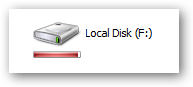
You'll notice the new icon looks very similar to the ones in Vista, but the more interesting addition is the new bar under the icon that gives you a tiny graph of the current drive space.


The graph will show up on most of the icon sizes other than the details view.


When your drive is running low on space the graph will turn red to indicate that you should probably stop downloading so much.


You can see in task manager that it really doesn't use all that much memory.


Source