Showing posts with label Xp. Show all posts

Wednesday, December 26, 2007

Make Your XP Computer Look Like OS X

For whatever reason, many Windows XP users are obsessed with making their desktop look like a Mac. It's not a new phenomenon, but the enterprising people over at FlyakiteOSX created a really easy way to transform your desktop into an OS X look & feel without a lot of trouble.

Note: This installation will change a lot of files and install a whole bunch of utilities, so proceed with caution if you aren't prepared to deal with any problems that might happen.

When you launch the setup you'll eventually get to this screen, where you should check the box for "Create System Restore Point", along with whichever options you want.

image

After installation and rebooting your computer, you'll be presented with a desktop that looks very much like OS X.

image

It even updates your shutdown screen…

image

And the login screen…

image

There's an included "System Preferences" application that looks just like the one in OS X, but works differently… when you click on the icons it will launch the relevant Windows settings panel.

image

If you have problems trying to remove this, remember that you setup a Restore point during setup. You can always return everything back to normal by using System Restore if you need to.

Source

Download FlyakiteOSX from flyakiteosx.com

Saturday, December 22, 2007

Microsoft's 12 Gifts of Christmas

For holiday 2006, Microsoft offered up a big lump of coal, as in no Windows Vista. Is someone feeling guilty or what? This year, Microsoft has unloaded a bag full of gifts for the holidays. I pick the 12 best.

And, no, no, no, no, no! I won't be setting these gifts to music. Please feel free to sing through the 12 gifts, but I won't help you. That parody approach long ago became a bad joke.

So, what were Microsoft's best gifts, from 12 to one? Here's my list:

12. Connect 3.0 beta. The list begins with a little lump of coal in the Christmas stocking. Microsoft is testing a new Connect Web site. It's time for the Microsoft beta tester revolt, because the new site is butt-ugly. No thanks, Santa!

11. Windows, code name 7. OK, so you haven't deployed Vista yet and loathe the prospect of testing. No worries, Microsoft has started dropping hints about successor Windows 7. It's a gift! In a Dec. 11 blog post, Microsoft's Hilton Locke wrote: "If you are impressed by the 'touch features' in the iPhone, you'll be blown away by what's coming in Windows 7." Did you get a gift receipt for that iPhone?

10. The 11-cent reward. Yesterday, Microsoft announced an 11-cent-per-share dividend for stockholders. For all those Microsoft investors pining for the good old share growth days or Google's stratospheric share price, every little bit helps. I don't get anything. For conflict-of-interest reasons, I don't invest. Say, don't spend it all at once!

9. Bill Gates' Office 2007 tutorial. Microsoft's chairman wants you to know how he uses his company's software. Sorry, I couldn't get past the dreamy description of Gates' gear: "Three large flat-screen displays ... synchronized so they work like a single very wide display." I also got a warm, fuzzy feeling about Gates' management style. He wrote, "Each year I do something called ThinkWeek where anybody in the company can submit a paper about an idea they have to change the way our company works or to pursue a new development project." Oh, yeah, and he uses Office 2007, too!

8. Vista's disabled off switch. Microsoft will finally do away with one of Vista's most loathed features (c'mon, you hate it more than Universal Account Control pop-ups). Vista will no longer disable if not activated. This could have ranked as a bigger gift, but Microsoft still requires businesses with volume-license keys to use activation servers. OK, so it's not the present you really wanted.

7. Internet Explorer 8's acid trip. IE7's first year of application-breaking mayhem has passed, and Microsoft execs are suddenly talking about its successor. Considering Microsoft has said nothing about IE8 for the first 11 months of the year, the sudden disclosure is quite the gift. Surely, everyone is so proud of how grown-up IE8 is. The browser passed Acid2.

6. Server protocols. Yesterday, Samba licensed server protocols from Microsoft, as required by the 2004 European antitrust ruling. But developers should be careful what they ask Santa for. Microsoft may benefit more from the protocol program than licensees. Is this like when I give my wife a DVD that I want to watch more than she does? Happy Christmas!

5. A ribbon for Popfly. Microsoft gave its mashup site and service a nice makeover, just in time for the holidays. The Popfly Web Creator now incorporates stylistic elements from the Office 2007 ribbon. Microsoft just wants you to feel as comfortable on the Web as when using desktop software. Santa says: "Begone with archaic browser motifs!"

4. Office 2007 and SharePoint Server service packs. Microsoft knows that you really don't need them. But socks and underwear (ah, thanks, mom) are what someone gives when they don't know what else to give or they don't care to find out what you want. Microsoft checked a box on the gift list and, poof, Service Pack 1 arrived.

3. Hyper-V. Microsoft even called the Dec. 13 Hyper-V beta a gift. Santa "developers, developers, developers" Steve Ballmer must have pushed the elves hard to get out the virtualization software in time for the holidays. Hyper-V testing is the perfect break from all that chaotic Christmas shopping. You've nothing better to do, right?

2. Search visualization. For all those developers tired of boring, text-driven searches, Microsoft has a gift. This week the company released Windows Live QuickApps code for Tafiti search visualization. What happens when Silverlight meets Live Search? Tafiti! Developers, Microsoft wants you to feel young again, like when Santa brought you that first set of Legos or building blocks.

1. Windows XP Service Pack 3 Release Candidate 1. You know you need it and maybe even want it. The world runs on Windows XP. It's Microsoft's most successful operating system ever. For the zillions of people waiting on switching to Vista or never going to it, Windows XP is their computing lifeblood. SP3 is that new transfusion. Say, why not celebrate the holidays with a Windows XP tattoo? Why should the Zune tattoo guy have all the fun?

Source

Friday, December 7, 2007

Generate a List of Installed Drivers from the Command Line

We've already covered how to take a quick look at the list of installed drivers using DriverView, but what if you are on a machine that doesn't already have that software installed? There's a command line utility that comes bundled with Windows Vista or XP that gives you similar output.

It's also useful if you are a command line junkie and have cygwin installed… you can just pipe the command through grep and quickly see exactly what you are looking for.

Running the command with no parameters will give you the default output:

image

To get verbose output you can use the /v parameter:

driverquery /v

Or to output in list or csv format instead of the default table format, you can use the /FO switch

driverquery /FO [list, table, csv]

So for instance, if you ran the following command to give you verbose information in list format:

driverquery /FO list /v

You should see output similar to this:

image

If you have cygwin installed you could pipe this through grep, but you should be able to pipe the output into a file, for instance like this:

driveryquery > test.txt

image

Always useful to know how to use the command line!

Source

Tuesday, December 4, 2007

Microsoft: Vista piracy rate is half that of XP


Microsoft said Monday that it's seeing piracy rates for Windows Vista that are half those of Windows XP.

Now cynical me wanted to write this up as "even pirates prefer XP two to one over Vista," but that wouldn't be fair. In reality, the decline in piracy rates is largely due to the fact that Vista is much tougher to fake than XP.

"Piracy rates are lower because it's harder," Microsoft Vice President Mike Sievert said in an interview Monday.

There are a variety of reasons for that, including the fact that businesses no longer have volume license keys that can be used to activate an unlimited number of machines. Another is the fact that Vista machines that aren't properly activated pretty quickly become basically unusable once they enter "reduced functionality mode."

For Microsoft, the gains have been significant. In its last earnings call, Microsoft said that five percentage points of Windows growth could be attributed to gains in piracy.

Interestingly, though, Microsoft makes the experience a little less harsh for those running pirated versions of Vista. With Service Pack 1, Microsoft is doing away with reduced functionality mode in favor of putting prominent notifications on systems that are not found to be genuine.

Non-genuine systems with SP1 will display a warning at start-up that the system is not properly activated. Users will have the option to "activate now" or "activate later," though the second option won't show up for a time. Users will also have their desktop background changed to white and a prominent notification placed in the lower right hand corner saying that the machine is not genuine.

Still, in a significant change, those with non-genuine or non-activated copies of Vista will still be able to use their systems. Sievert said the change is designed to minimize the impact on customers who might unwittingly have gotten an illegitimate copy of Vista while still discouraging piracy.

"People won't want this experience," he said. "At the same time it will be broadly interpreted as being more fair."

Still, I wonder if the move won't cause Vista piracy rates to trend back up. I would think there are people who will deal with a copy of Vista they don't pay for but that has a big ugly notification on it. With the current Vista, they don't even have that option.

Also with SP1, Microsoft is closing two key loopholes that pirates have used to evade Microsoft's security measures. One involves mimicking the process used by large computer makers to preactivate their Vista machines, while the other extends the grace period that customers have to activate their machine, in some cases extending it for decades. It's not the first time that Microsoft has moved to close holes in its activation process. A year ago, the company changed Vista to disable a hack known as "Frankenbuild" that merged elements of the final Vista with a prerelease version.

Source

Monday, November 26, 2007

Hack Attack : Get Windows XP SP3 Through Windows Update

windows_xp_logo
Well If you have read my previous Hack Attack on How you can download Windows Vista SP1 through a Hack and it worked for you then here is another Hack that will allow you to download Windows XP SP3 RC1 directly from Microsoft.
Windows XP SP3 will be the final service pack that we will see for the World’s biggest Operating System from Microsoft. SP3 will bring a host of bug fixes and some new features borrowed from Vista.

Well here is how you can download SP3 straight from Microsoft.

Follow the instructions carefully and you’ll be running Windows XP SP3 in no time. Grab yourself a cup of Coffee as you do this..

Don’t fret too much, this won’t take much time. I can assure you that..
  • Download this file ( WindowsXPSP3Hack.cmd). Once you have downloaded the file, login as administrator and run the file by double clicking it. Wait for the Confirmation Message on screen.
  • The Above file adds a few entries to the Windows Registry that makes Microsoft think that you are a part of the Private beta program.
  • Check for new updates on Windows Update. You should now see Windows XP SP3 listed in the available updates.
  • Download and install it. Reboot whenever necessary.
Please note this hack is the exact way Microsoft expects its beta testers to try Windows XP SP3 out, so you don’t have to worry too much about Microsoft catching hold of you.

I tried this on Windows XP Machine and this hack worked like a charm. Let me know if this works for you.. If you can’t wait for Microsoft to release SP3 officially then this hack is for you.

Spread the word around, so that many more people can download the 3rd Service Pack.

Source

Wednesday, November 14, 2007

One Care 2.0 Final - Coming Soon


Looks like OneCare 2.0 could be going gold very soon. As well as it showing up on Amazon.com with a retail release date of next week, an email sent to OneCare users tonight suggests that a web release will be even sooner than that. On top of that, the OneCare installation page has been unavailable for several hours tonight, which is always a good sign that a release is right around the corner.


For those of you already using OneCare, you should be prompted to upgrade once the new version is available, though you can still upgrade manually once its out. If you haven't been testing the OneCare 2.0 beta, you should read up on the new features before it launches - new features include multi PC management, centralised backups and much more. You never know, it might just catch your eye... ;)

Source

Unofficial Windows XP Themes Created by Microsoft

Anybody who has ever tried to change the theme in Windows will
already know that you have to hack the uxtheme file in order to install
themes into XP that aren't digitally signed by Microsoft. If you would
rather not or are unable to patch your system you might be interested
in these unofficial themes created by Microsoft.


There might be other themes out there, but these are the ones I know
about. Feel free to inform everybody in the comments if you know of any
others.


Royale


This theme is really bright and blue… Just look at all that blue…


image


To install this theme you'll need to download, extract the zipfile,
and then run the installer. When prompted for the location to save the
files, leave it set to default.


image


Now you can go into your display settings and change the theme from the list.


Download Royale Theme from Softpedia


Royale Noir


This theme was supposed to be a darker version of the regular Royale
theme, but it wasn't really finished before somebody from Microsoft
published it, and it spread all over the web.


image


After downloading and extracting the zipfile, you'll need to copy
the royale_noir folder into C:\Windows\Resources\Themes and then
double-click on the Luna.msstyles file found in that directory and
change the settings to match the above screenshot.


image


Download Royale Noir theme from istartedsomething.com


Zune Theme


This theme was released to celebrate the Zune launch, and you'll
notice it's very similar to Royale Noir, except for the kinda ugly
orange start button. Long time readers will note that we've mentioned this theme before.


image


Installing this theme is really simple… download and run the installer.


Download Zune Theme from Microsoft.com

Source

Tuesday, November 13, 2007

Get Vista Style Drive Icons in Windows XP

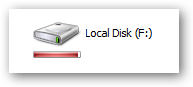
One of the nice little features in Windows Vista that you don't think about is the graph of drive space for your drive icons, so you can visually see at a glance how much space is used. There's no reason to upgrade for this feature, especially since some programmers created a small utility for XP that gives you the same functionality.

You'll notice the new icon looks very similar to the ones in Vista, but the more interesting addition is the new bar under the icon that gives you a tiny graph of the current drive space.


The graph will show up on most of the icon sizes other than the details view.


When your drive is running low on space the graph will turn red to indicate that you should probably stop downloading so much.


You can see in task manager that it really doesn't use all that much memory.


Source