Showing posts with label tricks. Show all posts

Monday, November 19, 2007

Installing Windows Media Player Plugin for Firefox

So you just bought a training video and popped it into your computer. You click on the menu in the autoplay dialog and it opens up Firefox, your default browser. Now you are staring at a blank screen.
What now?

The problem is most likely because you don't have the Windows Media

Player plugin installed for Firefox, so all we need to do is install it.

Note that you'll usually have the same problem anytime you try and view video files in FIrefox using Windows Media format, such as .wmv files.

Installation

Just download and run the plugin installer linked below. You'll probably want to close Firefox during the installation.

Verifying Plugin Installation

After running through the very quick installation wizard, you might be curious if the installation actually worked. While the easiest method is to just open a Windows Media video, you can also type the following into the address bar to see the list of loaded plugins:

about:plugins

And you should see the Windows Media Player plugin in the list. You can also see which file types Firefox will use the plugin on.


image


And now I can view this Windows Media format video file in Firefox…


image


Technical Notes


In case you have any issues with this installer, you might want to take a look at this list to help with your troubleshooting:


  • The WMP plugin uses the IE Proxy settings, not the ones in Firefox.
    This is because the plugin itself is only a thin wrapper around Windows
    Media Player, which always uses IE internally to fetch data.
  • The plugin files are installed to the "C:\Program Files\Mozilla
    Firefox\plugins" directory by default, and the file name is
    np-mswmp.dll. If the uninstaller fails to remove this file for whatever
    reason you can manually delete it.
  • You could also theoretically copy the same .dll file into the
    plugins directory on any Firefox installation and it should work
    without running the installer.

image


Download Windows Media Player Firefox Plugin from port25.technet.com

Source

Thursday, November 15, 2007

Speeding up VNC on Vista By Limiting Visual Effects

As a computer field tech, I use the remote desktop program UltraVNC quite often. I utilize it mostly to connect to offsite computers so I can run diagnostics and repair remotely, if needed.

Recently, I ran into an issue with UltraVNC and Vista. I was able to connect but the desktop was slow to the point of being almost non-responsive. There was no way I would be able to diagnose let alone repair anything over that connection.

After adjusting various color depth and screen resolution options without any noticeable improvement in speed, it dawned on me that I was connected to an Aero enabled Windows Vista machine. Sure enough , when I disabled Aero, the remote desktop sprang back to life.Here’s how disable all Aero features for UltraVNC sessions.

Disable Visual Effects

Right click on Computer, and choose Properties.

image

Click on Advanced System Settings, and then under Advanced, click Settings.

image

Select the "Visual Effects" tab, and then click “Adjust for best performance” and OK.

image

I've found that this dramatically speeds up the remote connection. Note that you should probably re-enable the old setting
after you are done.

Editor's note: This is a helpful way to speed up any remote desktop solution, not only for VNC.

Source

Wednesday, November 14, 2007

Unofficial Windows XP Themes Created by Microsoft

Anybody who has ever tried to change the theme in Windows will
already know that you have to hack the uxtheme file in order to install
themes into XP that aren't digitally signed by Microsoft. If you would
rather not or are unable to patch your system you might be interested
in these unofficial themes created by Microsoft.


There might be other themes out there, but these are the ones I know
about. Feel free to inform everybody in the comments if you know of any
others.


Royale


This theme is really bright and blue… Just look at all that blue…


image


To install this theme you'll need to download, extract the zipfile,
and then run the installer. When prompted for the location to save the
files, leave it set to default.


image


Now you can go into your display settings and change the theme from the list.


Download Royale Theme from Softpedia


Royale Noir


This theme was supposed to be a darker version of the regular Royale
theme, but it wasn't really finished before somebody from Microsoft
published it, and it spread all over the web.


image


After downloading and extracting the zipfile, you'll need to copy
the royale_noir folder into C:\Windows\Resources\Themes and then
double-click on the Luna.msstyles file found in that directory and
change the settings to match the above screenshot.


image


Download Royale Noir theme from istartedsomething.com


Zune Theme


This theme was released to celebrate the Zune launch, and you'll
notice it's very similar to Royale Noir, except for the kinda ugly
orange start button. Long time readers will note that we've mentioned this theme before.


image


Installing this theme is really simple… download and run the installer.


Download Zune Theme from Microsoft.com

Source

Tuesday, November 13, 2007

Get Vista Style Drive Icons in Windows XP

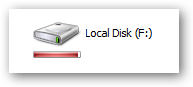
One of the nice little features in Windows Vista that you don't think about is the graph of drive space for your drive icons, so you can visually see at a glance how much space is used. There's no reason to upgrade for this feature, especially since some programmers created a small utility for XP that gives you the same functionality.

You'll notice the new icon looks very similar to the ones in Vista, but the more interesting addition is the new bar under the icon that gives you a tiny graph of the current drive space.


The graph will show up on most of the icon sizes other than the details view.


When your drive is running low on space the graph will turn red to indicate that you should probably stop downloading so much.


You can see in task manager that it really doesn't use all that much memory.


Source